
Starting November 12, any Backup of WhatsApp that has not been updated for more than a year will be completely deleted from the Google Drive servers and will not be recoverable.
Most communications now occur through WhatsApp, which offers the option to store all conversations, photos, videos or files in Google Drive in the cloud, if you do not want to delete them completely.
But Google has just announced that backup copies that are more than 1 year old will be deleted. And, for this reason, it recommends that those who want to keep them make a new copy of the messages and files before November 12.
Why is this?
This measure is related to the announcement that the weight of the copy of WhatsApp in Google Drive, from now on, will not affect the total space of that Google tool to manage and save documents in the cloud.
The deletion of backup copies older than 1 year will only affect WhatsApp users for Android. Since in iOS, the iPhone operating system, backup copies are made in iCloud.
For now it is unknown if WhatsApp will try to reach a similar agreement with Apple so that backups do not take up space in iCloud online storage plans either.
Steps to follow
To make a backup copy of all WhatsApp conversations on Android, what you have to do is:
First Step
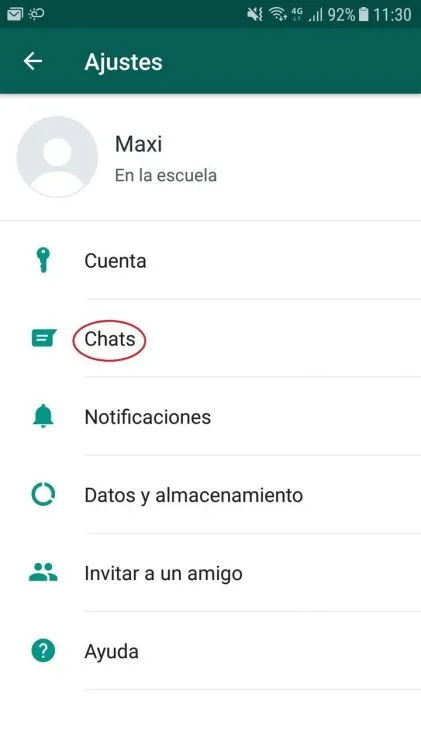
Login to WhatsApp
To be able to keep backup copies from a long time ago, we must first enter the publication. Then, follow the order by touching Menu -> Settings –> Chats.
Second step
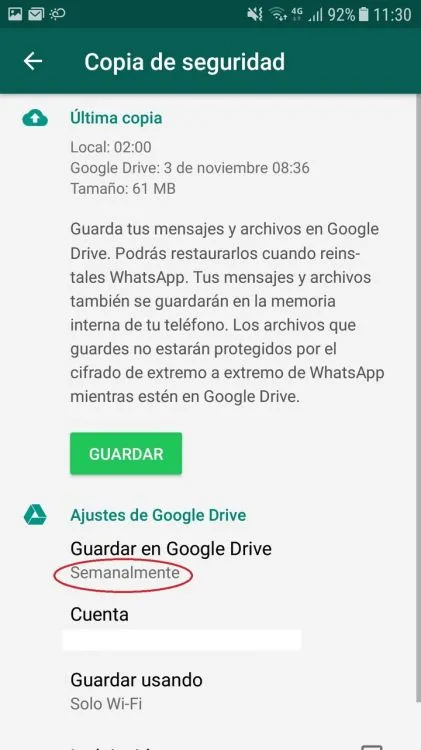
Enter Backup
Once in the "Backup" option, you must specify how often we want them to be performed. The options are:
- Never
- Only when I play "Back Up"
- Daily
- Weekly
- Monthly
Third step
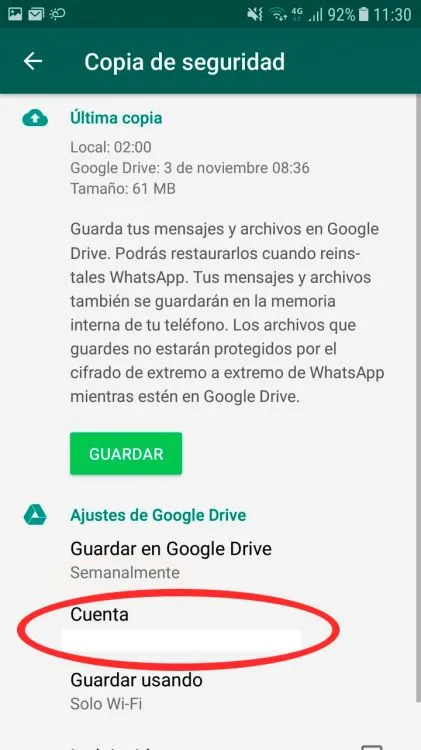
Specify the account where the Backup will be sent
Once you have chosen how often to perform the Backup, you must specify the Google account in which we want to store them and select the type of connection that will be used for the copies. They can be:
- Mobile network
- Wi-Fi
Updated on: 09/11/2018 00:00:00

Sistemas a medida y Automatizaciones
Desarrollamos sistemas a medida que automatizan procesos, mejoran la gestión y te permiten escalar tu negocio con soluciones ágiles y flexibles.