Just like other messaging applications, WhatsApp allows you to create groups and from there maintain conversations with people of interest. Whether between co-workers, schools or parents, groups are ideal for sending a mass message.
But what happens, in certain circumstances we want to send a message to several people and we do not necessarily have to create a group to do so, for example an invitation to an event, a greeting for the end of year holidays or some special notice.
WhatsApp has a function to send mass messages. None of the recipients will find out that they received the same greeting as the rest, they will surely suspect. It is called Broadcast List and allows you to create a list to avoid copying and pasting the message to multiple contacts.
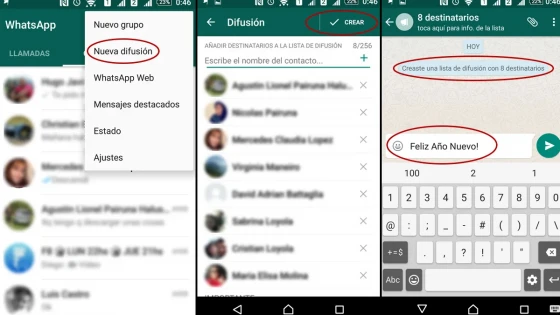
The Broadcast List is accessed from the WhatsApp options / New broadcast menu. Once we have found access to the lists we can see that we have a button with the + symbol to add contacts to the list. We cannot add anonymous people but rather they are part of our contacts on WhatsApp. The user will then only have to send their message, if desired we can also add audio, video and photos.
We will select all the contacts that should receive our message and we will give a name to the list. After doing so, we can start writing messages that we want to send to the recipients. Those who respond will do so in the normal way as if we were talking normally.
I hope it helps!
Updated on: 31/12/2015 00:00:00

Sistemas a medida y Automatizaciones
Desarrollamos sistemas a medida que automatizan procesos, mejoran la gestión y te permiten escalar tu negocio con soluciones ágiles y flexibles.