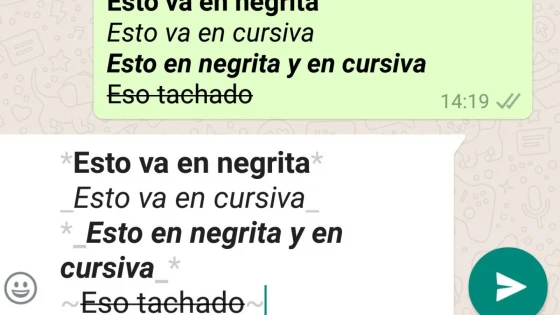
Let us remember that days ago WhatsApp added the possibility of send documents to a contact. On this occasion, if you are one of those people who likes to highlight phrases with bold, italics or crossing out the text, WhatsApp now allows you to do so, but I must clarify that the methodology is not the classic shading of the text and then marking a button, as in a word processor. In any case, it is quite easy and you can do it without problems.
How to bold a word
Before and after the word you must add an asterisk to make it bold. For example:
For example:
Today I am learning to put *bold* with WhatsApp
Result:
Today I am learning to put bold with WhatsApp
How to italicize a word
To italicize a word in WhatsApp, we will use underscores.
For example:
Today I am learning to use _italic_ with WhatsApp
Result:
Today I am learning to use italic with WhatsApp
How to cross out a word
Similar to the previous ones, but using the ~ symbol
For example:
Today I am learning how to ~cross out~ words with WhatsApp
Result:
Today I am learning how to cross out words with WhatsApp
These changes should appear in version 2.12.17 on iOS and from version 2.12.535 on Android.
If you message someone with these new keyboard options, they will only be able to see them if they have an updated version of WhatsApp.
Updated on: 05/04/2016 00:00:00

Sistemas a medida y Automatizaciones
Desarrollamos sistemas a medida que automatizan procesos, mejoran la gestión y te permiten escalar tu negocio con soluciones ágiles y flexibles.