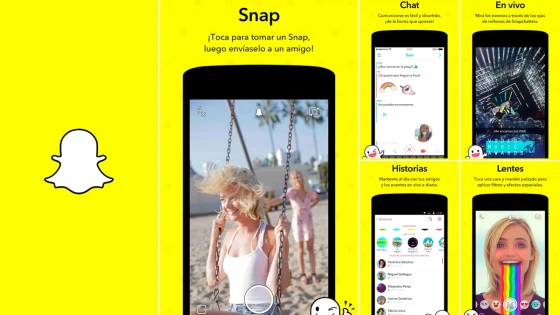
Snapchat is a mobile application that, acting as a messaging service, combines the sending of files; Mainly photos and videos, which disappear from the recipient's device once the user has seen them.
This new social phenomenon stands out among younger users, who give it a certain dynamism which is not viewed favorably by other generations. Snapchat's success is on the rise among the youngest people, so much so that there are rumors that Facebook managers tried to buy it for 3 billion, getting a resounding no from the creators of the app.
Its beginnings date back to 2011, developed by Artur Celeste, Bobby Murphy and Reggie Brown, students at Stanford University, in the United States.
Currently it throws flows of movements that produce It is similar to other apps with similar uses:
- + 100 million active users per day, of which 85% are between 13 and 34 years of age.
- + 400 million photos viewed per day
- + 8 billion videos viewed per day
How does it work?
Using Snapchat allows you to add or remove contacts or groups and Send them messages, whether photos or videos. So far very similar to an instant messaging app. The difference is that the sender chooses how long the receiver will be able to see the message, being able to choose between 1 and 10 seconds before it is destroyed. While the recipient is notified of its existence, they can see the message by holding it down and when they stop doing so it will disappear.
Snapchat prioritizes a fleeting conversation, it is not possible to store the photos or videos of our contacts. If a user tries to capture the phone screen, a notification will notify the other user of the action taken.
In addition to chat, it has other features such as live broadcasts, a handmade viewer, among others. It has a photo editor that allows you to apply special effects and filters.
The negative
The concept of Snapchat is something different from what is known until now and I suppose it is what most seduces young people. Perhaps those of us who have passed four decades of age have a small thorn in our minds about the scope and limitations that our children may have when using this application. With an application like this, it is clear that ZERO PARENTAL CONTROL, the truth is that given the great demand for content that children see, there are already records of parents complaining about sexting, where content with nudity and sex, among others, reigns. The sad thing is that there is no evidence of what the kids see. Before such accusations, the creators argued that the app was not conceived to see the wrong, that its use by some users was altered and logically they are not going to change the concept, it works and is a complete success.
Where can I download Snapchat?
Snapchat is available for:
- iOS (iPhone) (80 Mb approx.)
- Android (55 Mb approx.)
It goes without saying that use is limited to smartphones or tablets only.
First Steps
How to create a Snapchat?
It's easy, on the main screen we make a video or a screenshot. A tap on the bottom button captures a photo, holding it down records a 10-second long video.
We can apply a wide variety of filters to this, or include paint-style doodles and texts.
Once created we have the following options:
- Send it to a user (it can only be seen for a few seconds)
- Keep pressing to save it and view it for 24 hours in the Stories
Contacts and chats
By clicking on the Snapchat icon you are offered the basic settings of the tool. Among them, the function to add new contacts and friends.
Snapchat makes use of queries with the phone's contact book, adding using a Snapchat code or, the most direct and common is by entering the user's name.
On the right side are the private chats, sent to friends and contacts. Here you will also find photos, videos and texts that last longer than the famous 10 seconds.
Stories
By sliding the screen from right to left you access the stories. These are content that users publish so that their friends can see their recent activity.
At the same time, we can see the activity of our publication. We can do the same with our friends' stories. To see all their productions you have to make successive touches on the screen.
Live
There is also the Live section, these are those contents that are happening at the moment, such as sports coverage, music festivals, or others like that.
animated selfies
One of the qualities most appreciated by users.
If you want to activate the Snapchat animations to transform the selfie, you have to press and hold the face, and the different available filters will instantly appear. If you want to keep the photo or video, you must display the lower menu and select the icon located on the right to save the snap in the smartphone gallery.
Final Conclusion
While they are somewhat different segments, Facebook, Twitter, and even WhatsApp itself, shouldn't be looking favorably upon the Snapchat phenomenon. It makes sense; if we analyze it briefly, those users with social purposes will gradually abandon other social networks to embrace this new concept, as is usually the case.
From a commercial point of view, companies targeting young people, in addition to traditional ones, will also have to focus their online marketing campaigns on Snapchat to avoid being left behind in this new environment.
And you... have you started using Snapchat? Are you following us (user: codedimension)?
Updated on: 24/04/2016 00:00:00

Sistemas a medida y Automatizaciones
Desarrollamos sistemas a medida que automatizan procesos, mejoran la gestión y te permiten escalar tu negocio con soluciones ágiles y flexibles.