WhatsApp is the most used messaging service today, so far so good, but that does not mean that it is the application that absorbs the most space on our devices.
Photos, videos and documents weaken the capacity of any smartphone and many times that information is totally unnecessary.
A recent Android update allows you to easily delete the photos, videos and documents that come from this App.
This is a configuration option to free up space in a very simple way.
Data and storage usage
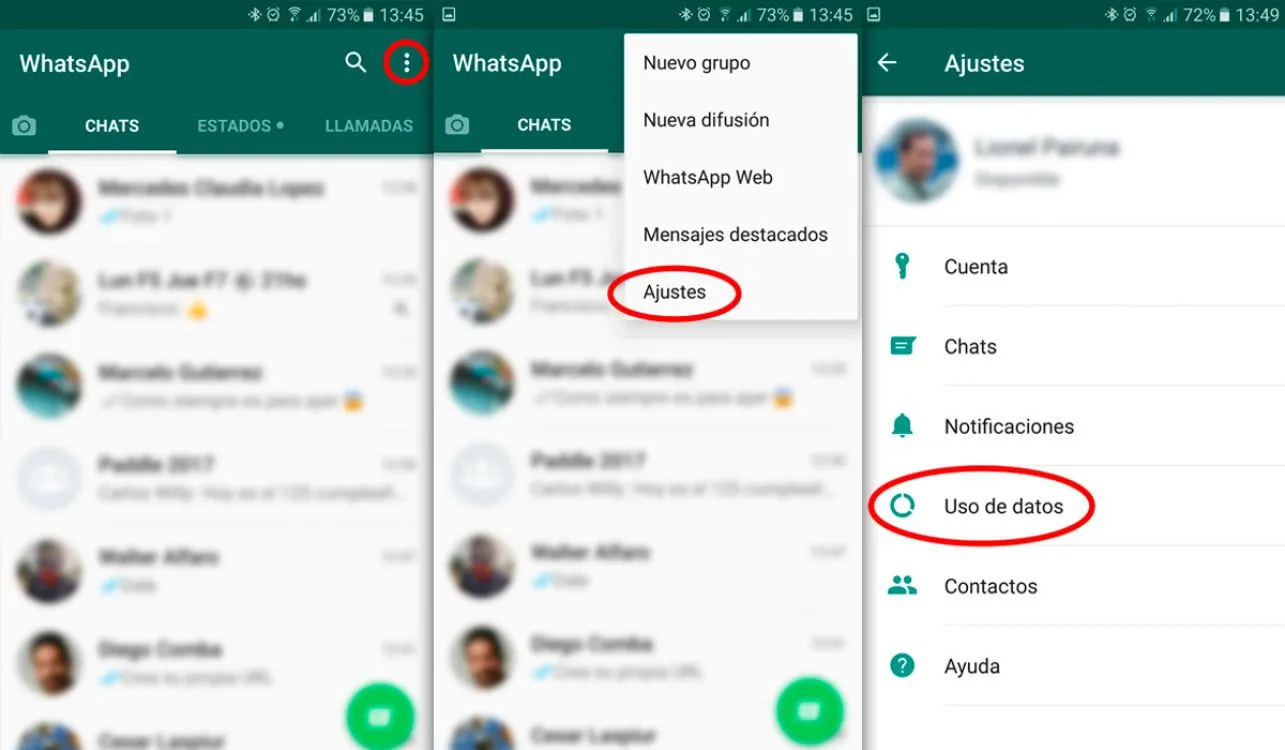
Enter WhatsApp, click on the three dots at the top of the application.
Then go to "Settings" and then "Data usage" or "Data and storage usage".
Manage messages or storage
You will be able to see a list with all the chats, and a detail with the space occupied by the data shared by this application.
You must select the conversation in which you want to free up space, and then you must press Manage messages or storage, which appears at the bottom of the screen.
File deletion
Once done, the user will be asked if they want to delete the selected files.
Updated on: 19/09/2017 00:00:00

Sistemas a medida y Automatizaciones
Desarrollamos sistemas a medida que automatizan procesos, mejoran la gestión y te permiten escalar tu negocio con soluciones ágiles y flexibles.