The measure will be taken by Google precisely to free up necessary space for the more than 1 billion people who use the messaging app every month. According to what was announced by the company, the new system will come into effect for all users starting next November 12, although some have already begun to notice that they were missing old photos and conversations.
"To avoid the loss of backups, we recommend that users make manual copies of their content archived by WhatsApp before that date," they warned. First of all, you have to check if you have not only memory on your cell phone to store them, but also available space in your Google account.
Update everything
In order to make the change, it is necessary that both your Google apps (If you have IOS, otherwise they are done automatically with Android) and Whastapp are updated to their latest version.
Enter the application
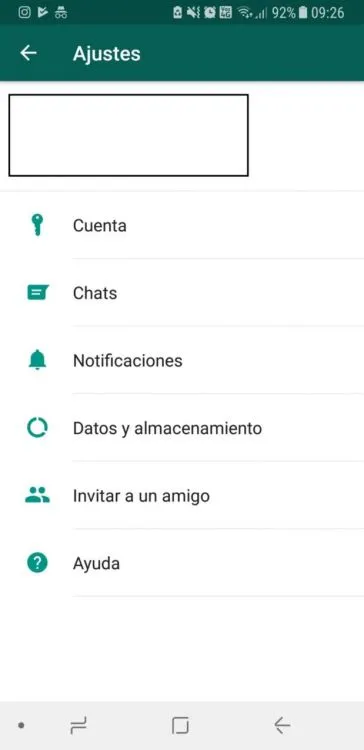
First step
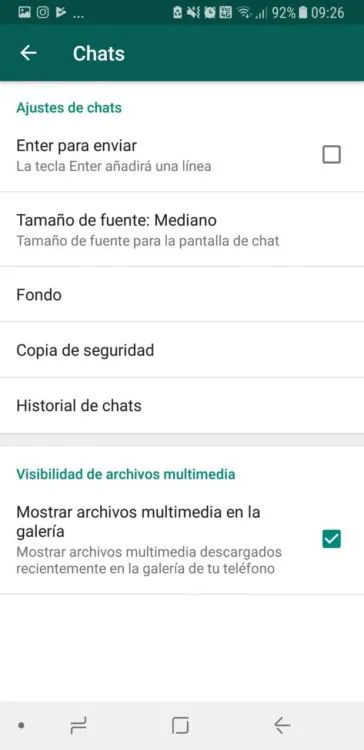
After having everything updated, you have to enter WhatsApp and go to the settings part. There, touch the "Chats" option.
Enter backup
Second step
After doing so, the entire menu for configuring the application's chats will appear. There you have to touch "Backup".
Change backup to your Google account
Third step
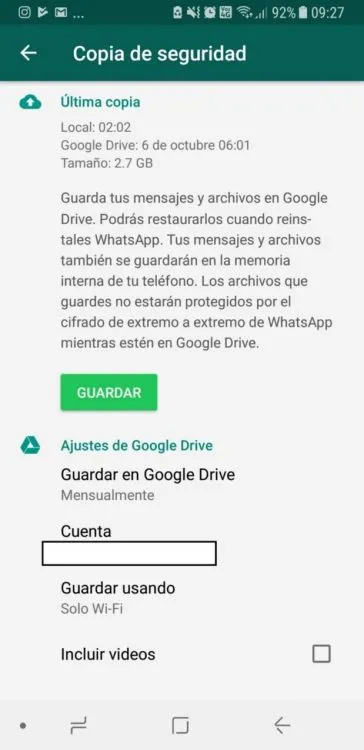
Once you do it, you have to change the backup location to your Google account, which will already be synchronized.
Related video
Updated on: 22/10/2018 00:00:00

Sistemas a medida y Automatizaciones
Desarrollamos sistemas a medida que automatizan procesos, mejoran la gestión y te permiten escalar tu negocio con soluciones ágiles y flexibles.