
The most popular social network in the world accumulates data from almost 1.5 billion people.
With this data, the giant created by Mark Zuckerberg sells segmented ads to other companies. For example, to a restaurant that seeks to reach women between 25 and 40 years old in a certain city who like Asian cuisine.
Even by adjusting the privacy settings, it is impossible to prevent the network from storing information about you.
In recent years, after controversial cases such as that of the Austrian Max Schrems - whose investigation into what Facebook knew about himself provoked the largest class action lawsuit against the company, the "Europe" case vs. Facebook" - the company has made its data and privacy policies clearer.
Read also: How Facebook finds out about your love affairs
I wanted to know what Facebook knew, so I downloaded the data about me that the social network has - you have to go to the "General" section of Facebook settings and click on "download a Copy of your information" -, and investigate other data stored in my profile.
This is some information surprising things that Facebook has on you.
The "coordinates" of your face
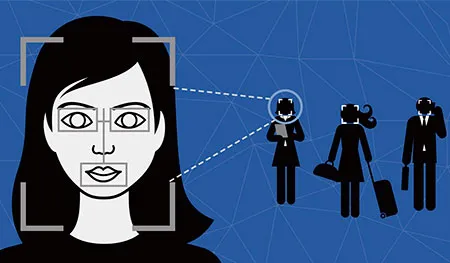
By downloading a copy of Facebook's main data about me, I got a package with files for photos and videos, and a file called "index.htm" that needs to be opened in a browser.
This file allows you to view this information in an organized manner.
After the first page of the file, where the personal information is, it is possible to see three lines of numbers that are equivalent to a kind of digital impression of your face, according to Thiago Tavares, from the organization Safernet.
"There are 34 points on the face that are fixed. The distance between these points can be calculated, and this calculation allows an algorithm to automatically identify a
That's why, when a friend uploads a photo of you in it, Facebook gets to know that it's you in it and suggests that they tag you.
But you can prevent the company from saving that map of your face and recognizing you in the photos.
To do this, you have to go to "Settings" and choose the "Nobody" option in the question "Who gets suggestions to tag you in photos in which you appear to be present?"
Know where you are, on and off the internet

One of the most surprising sections on Facebook is "Security."
There is information about the computers, cell phones and tablets that you used to enter the page.
In my case, the list covered the last three years. There are the IPs and also the dates and times in which I accessed Facebook, the browsers I used and even the cell phone operator with which I connected.
The file also has cookies that Facebook stored in your browser, files that record navigation traces about the time I spent on each page, the sequence of clicks I made, the data I entered in an online form, etc.
"If I disable it in my computer the storage of cookies, I cannot use Facebook or many pages and services. That is why these products are not free as most think. You pay with your personal data and with your privacy," says Tavares.
Even the photos you share on your profile can trace detailed data about where you were when you took it.
Photos that you "forgot" on your cell phone

The "synced photos" section of Facebook downloaded data is also intriguing.
As I did not have one, I did not know exactly what is stored in that section.
The Facebook app for smartphones currently has an option to automatically synchronize your cell phone with your profile on the network.
If you use the "connect with Facebook" option a lot on other pages and services, you should know that what you do on those pages can also be used on Mark Zuckerberg's network.
If the option is enabled, the page communicates with your cell phone and transfers the latest photos you took, without needing to do it manually, to a private album. If you want, you can make that album public and share photos with friends.
Thiago Tavares warns of the dangers of the tool. If someone gets your account password, they will have access to them.
"Many unintentional publications of intimate photos end up happening like this, such as activating automatic cell phone photo synchronization on Facebook. The person does not know it," he says.
What you would like to buy

In the "Ads" section of my data file, I found a long list of companies and topics that Facebook thinks I would like to see on my wall.
Most of the items were correct, but some didn't make much sense, like movies I don't like very much or names of cities I have no relationship with. Below is a list of ads that I clicked on the site.
According to Tavares, Facebook decides which ads it shows you based on your behavior on the social network.
If I don't want to see more ads on Facebook, there is nothing I can do, says Tavares.
"It is impossible not to see ads on Facebook, in the same way that it is impossible to have 100% privacy using social networks. One thing is incompatible with the other. It is selling ads how the platform makes money."
But does this mean that the company is sending this information about you to other companies? Facebook says no and, according to Tavares, it is not possible to prove otherwise.
All your searches

Not all of the data that Facebook stores about you is in that file available for download.
All your interactions, comments, "likes" and searches on the social network from the moment you logged in are stored in the "Activity Log".
To get there, click on the down arrow in the upper right corner of the page, next to the padlock.
One of the surprising details I found in that section, in the "Photos" item, are all the videos I watched within Facebook, even if I haven't "liked" them. the posts in which comments were not even written. Just press "play" and the site records that I saw it.
Similarly, everything I have typed in the search section since I created my account in 2007 is recorded: names of people, events and other keywords.
The activity log is the best way to know, in real time, the information you are giving to the site. If you share songs you are listening to, books you are reading, if you decide to see a friend's posts on your wall or confirm your presence at an event. Everything will be there.
Updated on: 07/11/2015 00:00:00
Source of Information: Camilla Costa / BBC Brasil
Disclaimer: The information presented does not constitute financial, investment, commercial or other advice and is solely the opinion of the writer. By using the information on this site, you agree that we are not responsible for losses, damages or injuries arising from the use or interpretation of the information.

Soporte Web y mantenimiento
Nos encargamos de mantener tu sitio web o sistema actualizados, seguros y funcionando correctamente.